
Cloud CMMS for Multi-Site Maintenance Teams: Closing the Visibility Gap Across Locations

08 Jul, 2026 · min read
Why maintenance visibility breaks down once operations span more than one site, what a cloud CMMS structurally changes, and how multi-location teams standardize preventive maintenance without losing local flexibility.
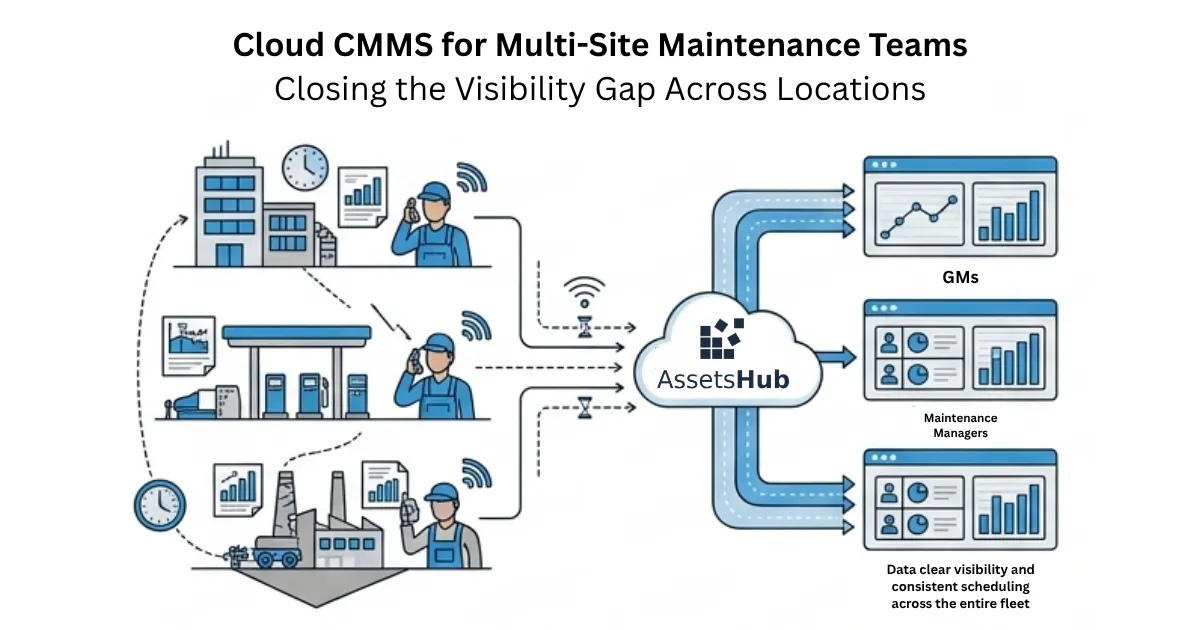
When "what's our uptime this month?" doesn't have a fast answer
A maintenance manager overseeing more than one location gets asked a simple question: what's our uptime this month? A day later, there still isn't a clean answer, because that number doesn't live in one place. It's split across a dozen notebooks, phone calls, and memories, one set per site.
This matters more today because most maintenance operations didn't start this way. A team grows from one site to three, then ten, then fifty, but the way it tracks maintenance rarely grows with it. It just gets copied, site by site, each one slightly different from the last.
The result isn't a dramatic failure everyone notices at once. It's quieter than that: an inspection that gets skipped at one location for months without anyone flagging it, spare parts sitting unused at one site while another orders the same part in a panic, and a compliance question that takes three phone calls to answer with any confidence.
What changes when maintenance spans more than one location
When maintenance work extends across more than one physical location, separate branches, plants, campuses, warehouses, or stations, the work itself doesn't change much. Assets still need scheduled attention. Work orders still need to be raised and closed. Parts still need to be on hand when something breaks.
This shows up everywhere: retail chains running dozens of stores, healthcare groups operating several facilities, manufacturers with multiple plants, logistics operators managing warehouses across regions, and fuel and energy networks running many stations. In every case, the maintenance workload is duplicated by site count, but the tools to manage it usually aren't.
That's the part organizations end up caring about. Each additional site multiplies the number of assets, technicians, schedules, and parts that need managing, without a matching increase in the capacity to oversee it all. A team that could reasonably track one site's maintenance health starts guessing once it's responsible for ten.
What a cloud CMMS actually is, in this context
Multi-site maintenance is the coordination of preventive and corrective maintenance work for physical assets across more than one operating location, ideally under one shared set of records and standards, not separate systems per site that don't talk to each other.
A CMMS (Computerized Maintenance Management System) is software that plans, tracks, and records maintenance work: assets, work orders, schedules, and parts.
A cloud CMMS is a CMMS hosted centrally and reached over the internet from any location, rather than installed separately on hardware at each site. That distinction is what makes multi-site coordination structurally possible: every site reads from and writes to the same system, not a local copy of it.
The structural pieces multi-site maintenance depends on
Site hierarchy : organization → region → site → asset, so every asset record always knows exactly where it lives.
Central registry vs. local visibility: one master list of every asset across every site, with each technician seeing only what's relevant to their own site day to day.
Standardized work order taxonomy: the same categories, priorities, and closure codes everywhere, so "critical" means the same thing whether it's raised at site 2 or site 20.
Role-based access: a technician sees their site, a regional manager sees their region, head office sees everything, without anyone needing a different tool to get there.
Shared master data vs. site-level execution: PM templates, asset classes, and the parts catalog are defined once, centrally. The actual work of completing tasks and consuming parts happens locally, site by site.
How a centralized system runs, step by step
The organization's site and asset hierarchy is set up once, centrally.
Preventive maintenance templates and schedules are defined centrally and assigned to the relevant asset classes or sites.
Work orders are generated automatically as each schedule comes due, and routed to the technician responsible at that specific site.
The technician completes the work on a mobile device, on-site, even without a live internet connection at that moment. The record queues locally and syncs once connectivity returns.
Parts consumed against the work order are deducted from that site's inventory, and the change is visible centrally the moment it syncs, not at month-end.
A single reporting layer aggregates every site's data automatically. Nobody copies numbers from site spreadsheets into a master file by hand.
A simple calculation becomes possible once data is centralized: fleet-wide uptime = (total scheduled operating hours across all sites − total downtime hours across all sites) ÷ total scheduled operating hours. Calculated per site, it's a local number. Calculated once, from the same dataset, across every site, it's a fleet number, and the two rarely tell the same story.
Reading the numbers correctly across sites
A backlog that stays consistently higher at one site than the others usually points to a staffing gap or an asset-class problem specific to that site, not a company-wide issue.
Uneven PM compliance across sites is more often a process or training gap than a technology gap. The same system is available everywhere; the difference is in how it's used.
A widening spread between the best- and worst-performing site over time is the signal worth watching. One bad month at one site is noise. A growing gap is standardization quietly failing.
What standardized visibility actually changes
Operational impact: leadership acts on current, comparable data from every site instead of piecing together whatever each site manager remembers to report.
Financial impact: parts sitting unused at one site can be reallocated to a site about to run out, instead of one location over-ordering while another places an emergency order for the same item.
Reliability impact: uptime stops depending on which sites happen to have a strong local manager. A consistent baseline across every location replaces a few high performers propping up the average.
Safety impact: a safety-critical inspection that's overdue at one location is visible the moment it's due, not months later, in an incident report.
Compliance impact: an audit answer becomes a report generated in minutes, not a set of phone calls to confirm what each site did and when.
A use case
This is an example scenario, not a specific case study. Consider a facilities company operating a dozen sites across several regions. Before consolidating maintenance records, leadership could only see maintenance status through monthly summaries each site manager assembled by hand, weeks after the fact.
Action: asset records, PM schedules, and work order categories were standardized once, across every site, while each site kept the freedom to organize its own day-to-day team as it saw fit.
Result: within a few months, leadership could see every site's PM compliance in real time, and the visible gap between the best- and worst-performing sites began to narrow, without adding a single technician or asset. What changed was how the work was recorded and seen, not the work itself.
Where multi-site rollouts actually get stuck
Adoption is uneven across sites: some technicians default back to paper or a phone call, especially early on.
Connectivity varies by site: an industrial yard or a remote location may not have a reliable signal all day.
Sites span different time zones: a maintenance window that works for one region can land in the middle of the night for another, making a single fixed schedule unrealistic.
Site managers can read central visibility as oversight: a loss of autonomy, rather than a tool that reduces their own reporting workload.
How to overcome these challenges?:
Roll out site by site, not everywhere at once, so lessons from an early site inform the next.
Design the field workflow offline-first, so a lack of live connectivity never blocks a technician from logging work.
Let central scheduling define what needs to happen and how often, while leaving the exact execution window configurable per site or region.
Frame the change around what it removes from a site manager's plate, the manual reporting they were already doing, not what it adds for head office.
What a platform like AssetsHub is built to handle
This is where a cloud CMMS platform like AssetsHub becomes the practical answer to everything described above: a single asset registry shared across every site, mobile work orders that keep working without a live connection, role-based dashboards so a technician, a regional manager, and head office each see exactly what's relevant to them, and PM scheduling that runs the same way regardless of how many sites are added.
None of this replaces the maintenance work itself. It removes the manual reconciliation that used to sit between doing the work and knowing it happened.
A single preventive maintenance cycle, end to end
A quarterly PM schedule for a specific equipment class comes due at Site B.
A work order is generated automatically and assigned to the technician on duty at that site.
The technician opens it on a mobile device, completes the checklist, and logs the parts used, even before confirming a network connection.
The record syncs the moment the device reconnects. Nothing is lost in the meantime.
Inventory at Site B adjusts automatically, and the regional manager's dashboard reflects it within minutes.
Head office's fleet-wide report updates on its own. No one collected or re-typed a single number.
Frequently asked questions
What's the real difference between a cloud CMMS and an on-premise one for multi-site operations?
An on-premise system usually runs on hardware at one location, which works for a single site but gets awkward once you add more, each site risks its own separate copy of the data. A cloud CMMS is reached over the internet from every site into the same system, so there's one record, not several that need reconciling later.
How many sites justify moving to a centralized system?
There's no fixed number. The real signal isn't site count, it's whether leadership can currently answer a simple fleet-wide question, like overall uptime or open work orders, without waiting on a call to each site. Once that answer takes more than a few minutes, consolidation is worth considering, whether that's three sites or thirty.
Does this work if a site has unreliable internet?
Yes, if the mobile workflow is designed offline-first. A technician should be able to open a work order, complete it, and log parts with no connection at all. The record queues locally and syncs automatically once the device reconnects.
Can a site keep some of its own local process while still reporting into one system?
Yes, and it usually should. Standardizing categories, priorities, and PM templates centrally doesn't require every site to work identically day to day. Local execution stays local; what's shared is the structure the data is recorded in.
How is spare parts inventory handled across multiple locations?
Each site's stock is tracked separately, since the parts physically sit at that site. What changes is visibility, head office and regional managers can see every site's stock levels at once, making it possible to move parts between sites before one runs out and another over-orders the same item.
Is AssetsHub secure enough for operations that get audited?
Centralizing records tends to make audits easier, not riskier, because there's a single, timestamped history of who did what and when, instead of separate paper trails or spreadsheets per site that vary in how completely they were kept.
Summary
Multi-site maintenance struggles for a structural reason, not a discipline reason: the tools multiplied by site instead of unifying, and visibility broke along the same lines. The fix isn't asking every site to try harder at reporting, it's removing the need for a separate report to exist in the first place.
Before adding another site to whatever's currently in place, it's worth asking whether the real question is how to track one more location, or how to stop tracking each one separately at all.